Driive
Smart Diary

A smarter diary for
driving instructors.

Day, week and month views built on your real working pattern — pupils request the gaps you actually have, cancelled slots are re-offered in one tap, and every lesson lands in the calendar you already use.

Day · Week · MonthBooking requestsOpen-slot offersGoogle · Apple · Outlook sync
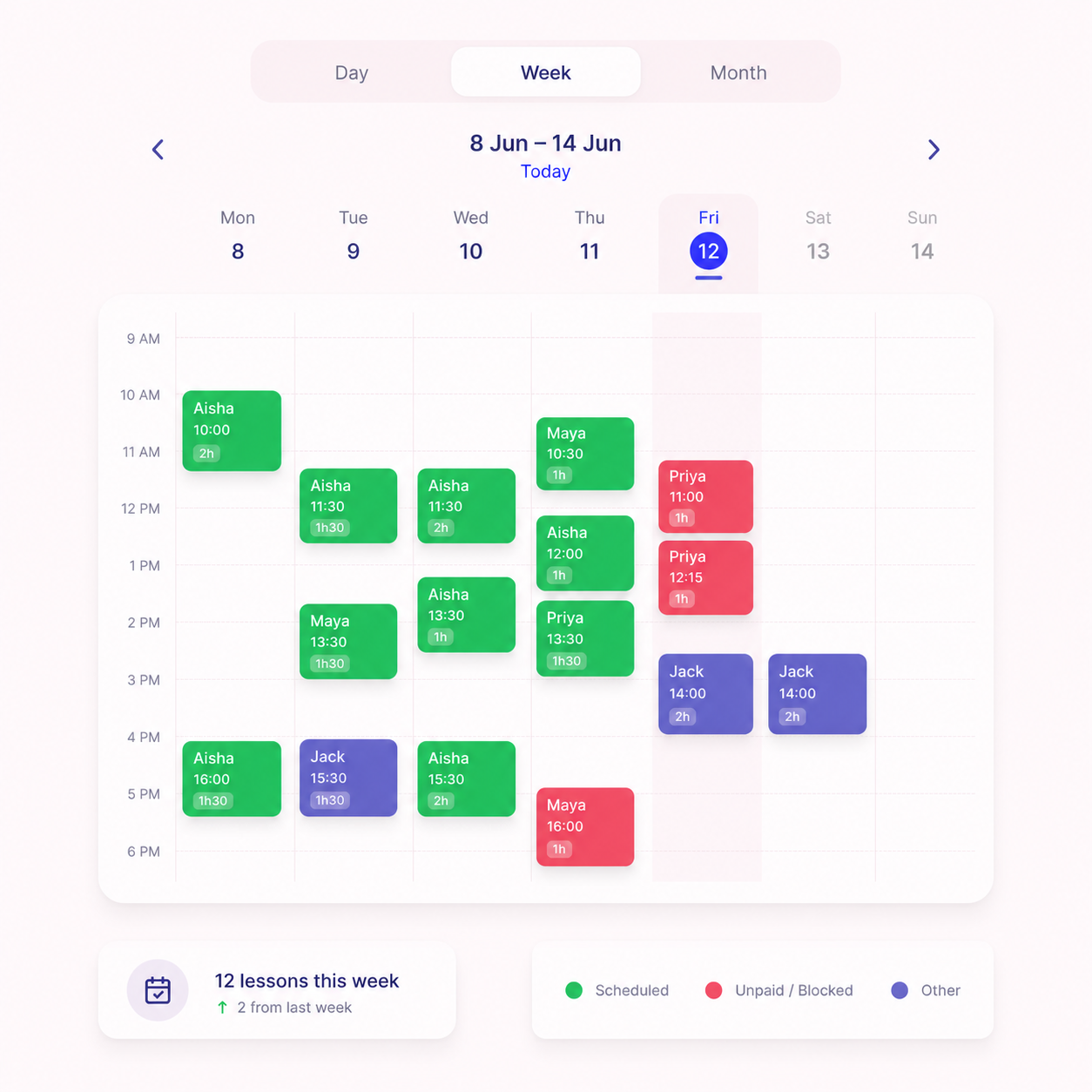
The Driive Smart Diary showing a week of colour-coded driving lessons

Colour-coded by payment

Paid, unpaid, block credit and awaiting payment each get their own colour — who owes what is visible from across the room.

Your gaps, counted

Free time is totalled for the day and the week, so you always know exactly how many sellable hours are sitting in the diary.

Day, week and month views

A live line through now, pick-up points on every booking, and a tap takes any month-view day straight into the detail.

Why instructors switch

The paper diary held up — until everything else moved into your phone.

A driving instructor's diary isn't a list of meetings. Lessons have pick-up points, travel time between them, pupils who pay in prepaid blocks, and a working week with school runs and days off carved into it. Generic calendar apps understand none of that — and the paper diary can't text your pupils.

The Smart Diary is built on those rules. You set your working pattern once — hours, recurring breaks, days off and the travel buffer you need between pick-ups — and everything else derives from it: the gaps pupils can request, the slots you can offer, and the free hours the diary totals up for you each week.

  • Bookings can only ever land in genuine gaps
  • Every lesson carries its pick-up point and lesson type
  • Payment status is visible on the booking itself
  • One change updates pupils, payments and calendars together
Your working pattern

Set your week once.
The diary defends it.

Your hours, breaks and days off aren't preferences — they're the boundary every booking is checked against. Nothing can land over your lunch, your school run or your Sunday.

Working hours

Mon – Fri · 09:00 – 17:00

Different hours for every day of the week, weekends optional.

Recurring breaks

School run · 15:00 – 15:45

Lunch, prayer, the school run — repeats weekly, booked around automatically.

Travel buffer

15 min between pick-ups

Back-to-back lessons without the sprint across town.

Days off & holidays

Sundays + two weeks in August

Block out a day or a fortnight in a tap — nothing can land on it.

Lesson lengths & prices

1h £38 · 1.5h £55 · 2h £70

Pupils request in the durations you offer, priced your way.

Your cars

Manual · Automatic

Run more than one car and the right one is attached to every lesson.

Booking requests

Pupils request.
You approve.
Nothing else gets in.

From their own side of the app, pupils see only the gaps you genuinely have — never your breaks, never your day off. Each request arrives with the duration, pick-up point and a note, and you approve or decline it in a tap.

Want the money first? Turn on pay-to-confirm and a requested slot is only held until the card payment clears — unpaid holds release themselves after 48 hours, so a slot is never blocked by a maybe.

  • Requests can only land in real gaps
  • Approve or decline with one tap
  • Block-funded lessons confirm instantly
  • Pay-to-confirm holds release after 48 hours
CB

Chloe Bennett

Booking request · 2h ago

New

Tue 16 Jun · 14:00 – 16:00

2 hrs · pick-up PO5 2AB

“After college works best — Wednesday could also work.”

Fits your gapBlock credit · 6h left
DeclineApprove

One tap — the diary, the pupil's app and both calendars update together.

Thu 18 Jun · 11:00 – 13:00

Cancelled

Maya cancelled — 2 sellable hours freed up

Offer slot to pupils

Offered to 14 pupils · 09:42

Liam Carter requested · 09:45

Slot filled

3 minutes later

Everyone else is stood down automatically — no “sorry, just gone” texts to send.

Open-slot offers

A cancellation is now
just an open slot.

When someone cancels, the gap doesn't have to die quietly. Offer the freed slot to every active pupil — or just the few you choose — in one tap, with a note if you like. The first request you approve takes it.

And if the cancelled lesson was prepaid, the hours flow straight back to the pupil's credit balance — the slot refills and the money sorts itself.

Calendar sync

In the calendar
you already use.

Driive doesn't ask you to abandon Google, Apple or Outlook Calendar — it feeds them. Three layers, from a simple subscription to instant push. Use one or all of them.

1

Subscribe once

A live feed puts your whole diary inside Google, Apple or Outlook Calendar — it refreshes itself, so the calendar app you check at night is always current.

2

Invites that follow the lesson

Every confirmed lesson arrives as a proper calendar invite, for you and the pupil. Reschedule and the invite updates itself; cancel and it disappears.

3

Push, the moment it changes

Connect Google Calendar and changes land the instant they happen — approve a request at a red light and it is on your calendar before the lights change.

Driving lesson — Chloe Bennett

Tue 14:00 – 16:00 · Pick-up PO5 2AB

Google Calendar

Pupils get calendar invites too — the lesson lives in both diaries, so “I forgot” stops being a reason.

Move a lesson once.
Everything follows.

Reschedule in the diary and the pupil is notified, calendar invites update themselves, and any block credit or payment is carried across — without you touching anything else. That's the difference between a calendar and a diary that runs the business.

FAQ

Asked by
instructors,
answered straight.

How do driving instructors manage their diary?
Most instructors run their week from a paper diary and a stream of texts, where every change means rubbing out, rewriting and re-confirming. Driive replaces that with a diary built on your real working pattern — hours, recurring breaks, days off and the travel time you need between pick-ups. Pupils request the gaps you actually have, you approve each one with a tap, and payments and pupil records update with the lesson.
Can pupils book driving lessons online?
With Driive, yes — pupils request lessons from the genuine gaps in their instructor's diary, from their own side of the app. The instructor approves or declines each request, so nothing lands in the diary without their say-so. Instructors can even require card payment before a booking is confirmed — unpaid holds release automatically after 48 hours, so no slot is ever blocked by a maybe.
What happens when a pupil cancels a driving lesson?
The slot goes back on the market instead of becoming dead time. In Driive the instructor offers the freed slot to all of their pupils — or just a few — in one tap; the first request they approve takes it, and everyone else is stood down automatically. If the lesson was prepaid, the hours return to the pupil's credit balance on their own, so the money side sorts itself too.
Does Driive sync with Google, Apple and Outlook calendars?
Yes, three ways. Subscribe once and a live feed keeps your calendar app current by itself; every confirmed lesson also arrives as a calendar invite that updates on reschedule and disappears on cancellation; and connecting Google Calendar pushes changes the moment they happen. Pupils get invites too, so the lesson lives in both diaries with the pick-up point attached.
Can I control when pupils can book lessons?
Completely. Pupils only ever see the genuine gaps in the working pattern the instructor sets — working hours, recurring breaks like the school run, days off and the travel buffer between pick-ups — and every request still needs the instructor's approval before it lands in the diary. Nothing is ever booked over a lunch break or a Sunday off.
Can Driive replace my paper diary?
That is exactly what it is built for. The Smart Diary gives you day, week and month views, colour-codes every lesson by payment status, counts your free gaps so you know what is sellable, and shows the pick-up point on each booking. Because bookings, payments and progress live in one place, a change made once updates everywhere — no rubbing out, no re-texting.
Works with

Smart Diary is stronger with the rest of Driive.

Put your diary
on autopilot.

Access opens in waves from the waitlist — founding instructors get in first.

Free to join · No spam · By joining you agree to our Privacy Policy.